It's 8 AM. You open your phone to post something. The cursor blinks. Your brain goes blank. You scroll through your competitors' feeds looking for inspiration, feel worse, and close the app. Maybe tomorrow.
If that sounds familiar, you're not broken. You're normal. 51% of content creators say the constant pressure to come up with new ideas is one of their biggest sources of stress. Not the filming. Not the editing. The ideation, that relentless demand to be creative on command, every day, across multiple platforms.
I built Muse because I lived this problem for years. Before Sydium existed, I had a running Google Doc titled "Post Ideas" that was 80% crossed-out lines and 20% ideas I'd never use. I tried BuzzSumo, Google Trends, scrolling Hacker News, watching TikTok. The information was out there, but assembling it into "what should I actually post today" was a job in itself.
Muse does that job for you. Every morning, it delivers two content cards to your dashboard: one based on what's trending, one based on your specific niche. Each card includes a creative angle, a format suggestion, a full content brief, and a one-click caption generator that uses your Brand Voice.
This is how it works, why it exists, and how to get the most out of it.

The Real Cost of "I Don't Know What to Post"
"Creator's block" sounds like a feelings problem. It's actually a business problem.
90% of creators have experienced burnout. 71% have considered quitting social media entirely. When you run out of ideas, you don't just skip a day. You skip a day, feel guilty, overcompensate with three mediocre posts, then burn out harder. The cycle feeds itself.
And the consistency you lose has a price. Companies that publish 16+ posts monthly generate 3.5x more inbound traffic than those posting four times or fewer. Businesses that blog get 55% more website visitors. Consistency is a compound growth engine, but only if you can sustain it.
The bottleneck isn't distribution. Scheduling tools solved that years ago. The bottleneck is ideation: what do I say today that's relevant, on-brand, and not the same thing I posted last week?

How Muse Works (Under the Hood)
Sources: Where the Ideas Come From
Muse doesn't generate ideas from nothing. It pulls from four live data sources every day, then filters them through your niche so you're not drowning in irrelevant trends:
- Google Trends - rising search queries and breakout topics in your region, via the Google Trends API.
- Hacker News - what the tech and startup world is talking about. Useful even outside tech, since HN often surfaces trends a few days before they hit mainstream social.
- YouTube - what's getting views in your category, which signals visual content opportunities with proven audience interest.
- TikTok - what's going viral in short-form. It moves fast but often points to broader cultural moments that apply across platforms.
Niche Configuration: Making It Yours
When you set up Muse, you pick your niche using the IAB Tier 1 taxonomy, the same categorization the advertising industry uses. You select up to three categories plus their subcategories, for example Technology & Computing > Software > SaaS, or Business > Entrepreneurship > Startups.
On top of categories, you add a free-text niche description (what you do, who your audience is, what makes your perspective unique) and keyword filters (terms to include or exclude). This combination means a fitness influencer and a B2B SaaS founder get completely different briefings even from the same trending topics.

The Two Daily Cards
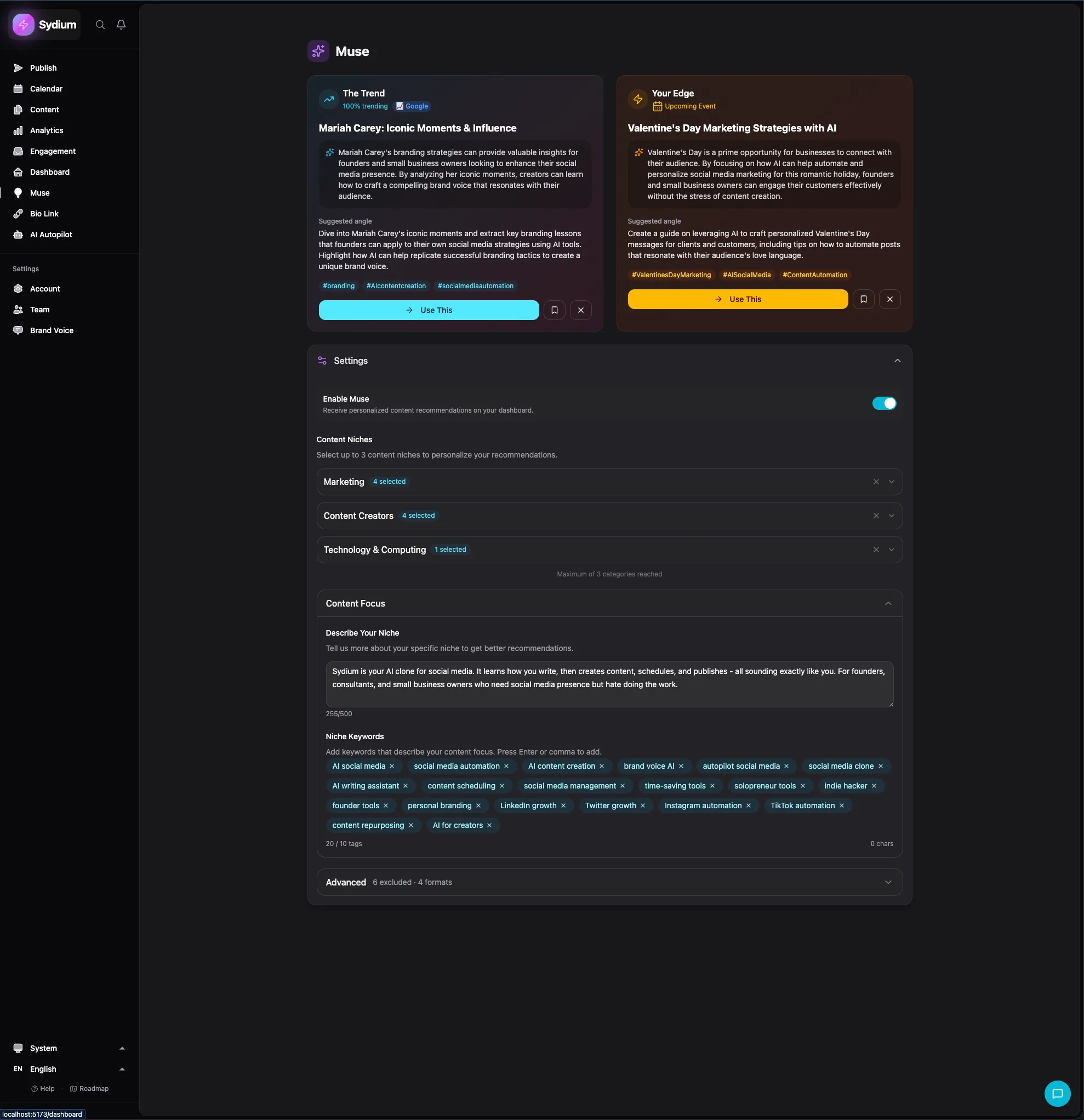
Every morning at 5:30 AM UTC, Muse generates two cards. The early time means the briefing is waiting when you wake up regardless of time zone, and the trend data is fresh from overnight activity.
Card 1: "The Trend" takes the most relevant trending topic from today's data and frames it for your niche. Card 2: "Your Edge" ignores trends entirely and generates an idea from your niche expertise: evergreen topics, gaps your competitors leave open, questions your audience is asking, and perspectives only you can offer.
Both cards share the same structure:
- The angle - not "post about this" but why your audience cares and the specific take that fits what you do.
- Creative hook - an opening line or concept for the post.
- Format suggestion - reel, carousel, text post, or story, with the reasoning for why that format fits.
- Content brief - a full outline you can work from, including key talking points.
- One-click caption - a ready-to-use caption in your Brand Voice. Edit it, tweak it, or use it as-is.
The combination is intentional. "The Trend" keeps you relevant and discoverable. "Your Edge" keeps you authoritative. Most content strategies fail because they lean too hard one way: chasing every trend dilutes your expertise, while only posting niche content limits your reach.

The Feedback Loop
Like every AI feature in Sydium, Muse learns from you. Each card has a thumbs up/thumbs down button. Thumbs up and Muse learns that type of angle, topic, and format works for you. Thumbs down and it adjusts. Over time it figures out that you prefer data-driven carousels over hot takes, or that you never post Stories. If you approve a Muse caption and it performs well after posting, that success also feeds back into your Brand Voice profile.
Muse + Autopilot Integration
This is where Muse gets powerful: connecting it to Sydium Autopilot.
In Autopilot's configuration, you set a "trend ratio" between 10% and 90% (default 30%). That's the share of Autopilot's generated content inspired by Muse's trending briefings versus your configured static topics. At 30%, if Autopilot makes 10 posts a week, roughly 3 come from trending topics and 7 from your pre-set topic list.
Trend-based content tends to get higher reach (it's topically relevant and often catches an algorithm boost). Niche content tends to get higher engagement from your existing audience. The ratio lets you balance reach against engagement based on your stage. A new account trying to grow might set it to 50-60%. An established account deepening loyalty might set it to 10-20%.
On an Agency plan, each client account gets its own Muse configuration with independent niche settings, keyword filters, and trend sources. Your fitness client gets fitness briefings while your startup client gets startup briefings, all from one dashboard. That removes the hours a senior strategist used to spend researching trends per client. The full agency workflow is in Sydium for agencies.
Practical Workflow: Using Muse Every Day
Here's how I actually use Muse (yes, I use my own product):
- Open the Muse cards over coffee.
- Read both briefings.
- Thumbs up or thumbs down each one.
- If one resonates, tap "Generate Caption" for a Brand Voice draft.
- Edit if needed, then schedule it or send it to the Autopilot queue.
That's it. Five minutes, two ideas, one of them usually good enough to post with minimal editing. The other goes into the backlog or gets rejected for tomorrow's replacement. If a Muse idea is strong enough to stretch across platforms, run it through Sydium's content repurposing instead of rewriting each version by hand.
Compare that to the old workflow: open Google Trends, check Hacker News, scroll TikTok (15 minutes, who am I kidding, 45), try to connect a trend to your niche, write a caption, find an image, schedule. That's over an hour on a good day, assuming you don't fall into the scroll hole. Muse compresses the ideation part to five minutes.
How Muse Compares to Other Content Ideas Tools
Every existing tool handles one piece of the puzzle. Trend data, content research, AI generation, or scheduling. None combine real-time trend intelligence with niche filtering and voice-matched briefs in a format you can act on in five minutes. Here's the landscape:
| Tool | What it does well | The gap |
|---|---|---|
| BuzzSumo (~$199/mo) | Shows what content performs in any topic area; strong trending feeds and influencer data | Gives you data, not a daily brief. Won't tell you what to say, in your voice, in a given format |
| Google Trends (free) | Raw view of what the world is searching for | You interpret it yourself. Muse uses it as one of four sources and handles the interpretation |
| Feedly + Leo AI (~$6/mo) | Curates industry news, surfaces relevant articles | A research tool, not a creation tool. Complementary to Muse, not a substitute |
| Copy.ai (free) | Generates ideas from a topic prompt on demand | Generic, with no sense of what's trending today or what you've already posted |
| ChatGPT / Claude | Ten ideas in seconds for any prompt | Doesn't know today's trends, your niche, or your history; you get "share a workout tip" |
| Hootsuite / Buffer AI | In-app idea suggestions and drafts | Mostly "repurpose your best post"; no trend intelligence or daily briefing format |
For the broader landscape of AI tools that touch content beyond ideation, see our AI content creation tools review.
We make Sydium, so this is not a neutral review. Pricing and features were checked against public vendor pages and may have changed.
What Muse Doesn't Do (And Why)
A few limits worth being clear about:
- It doesn't create finished content. Muse gives you ideas, angles, briefs, and captions. It doesn't film reels, build carousel slides, or design graphics. For visuals you'll still need your design tools or Sydium's AI image generation.
- It doesn't replace your creativity. Muse is a starting point. The best posts take a Muse angle and add your experience and your story. The AI gives you the "what"; you add the "why it matters when I say it."
- It doesn't guarantee viral content. No tool can. Performance depends on dozens of factors: timing, algorithm changes, audience mood, competition. Muse improves your odds by keeping you consistent and relevant. Anyone selling a "go viral" button is lying.
- It doesn't work without niche configuration. Skip the setup and you get generic ideas off broad trends. The whole value is in the filtering, so spend the five minutes on categories, description, and keywords.
Why Trend-Based Content Earns Its Place
Why mix trending content into your strategy at all? Short-form video is the top-performing format in 2026, and trend-based short-form gets the strongest algorithmic push: post about something people are actively searching for, and platforms reward you with distribution.
There's a discovery angle too. AI search visitors convert at four to five times the rate of traditional organic traffic, and trend-aligned content is more likely to surface in ChatGPT, Google AI Overviews, and Perplexity because it matches current query patterns. Muse's trend cards often include data points you can cite, which makes posts more authoritative and more citable.
But pure trend-chasing has diminishing returns. Audiences can smell inauthenticity. That's why Muse pairs trending cards with niche-specific "Your Edge" ideas, to keep you balanced between relevant and real.
Your First Five Minutes With Muse
- Open Muse in your Sydium dashboard.
- Select niche categories - up to three from the IAB taxonomy. Be specific: "Social Media Marketing" beats "Marketing."
- Write your niche description - two or three sentences on what you do, who your audience is, and what makes you different.
- Add keywords - terms to include and terms to exclude.
- Connect your Brand Voice so caption generation matches your style.
- Wait for tomorrow - your first briefing arrives at 5:30 AM UTC.
Even if you review everything manually, connect Muse to Autopilot from day one. Your content calendar then automatically blends trending content with your planned topics at the default 30% ratio.
FAQ
Can I request more than two ideas per day?
The daily briefing is two cards by design: enough to keep you inspired without overwhelming you. Your history of past briefings is always available, and unused ideas often stay relevant for days or weeks.
What languages does Muse support?
Muse generates ideas and captions in every language Sydium supports. Trend data is filtered by your geographic region, so you see trends relevant to your audience's location.
Is the trend data real-time?
It's collected and processed daily and reflects the past 24 hours. For breaking-news-level trends you'll still want to check platforms directly. Muse is optimized for "trending today," not "trending this minute."
The blank page is the enemy of consistency, and consistency is the engine of growth. Muse doesn't make you more creative. It removes the friction between "I should post something" and "here's what I'm posting." Two cards. Five minutes. Every morning. That's enough to keep you showing up.
Related free tools
Free, no signup, runs in your browser.
- Caption Generator - Generate engaging captions for any platform using AI. Get 3 variations with hashtags included.