You know the kind of LinkedIn post that opens with something like "Unlocking the full potential of AI-powered solutions is paramount for brands seeking to amplify their social media presence." Most people stop reading right there. You probably would too.
You can tell it was written by AI. Not because you ran it through a detector - because it sounds like every other AI-generated post on the internet. No personality. No edge. No reason to follow that person instead of the ten thousand others posting the same thing.
This is the core problem with AI content generation in 2026. The tools are powerful enough to write anything, but they default to writing nothing memorable. And it's becoming a real problem: 52% of social media users worry about brands posting AI-generated content without disclosure, and over 30% of consumers say they're less likely to buy from brands using generic AI advertising.
I built Sydium's Brand Voice AI to solve this specific problem. Not to generate "content" - to generate content that sounds like you wrote it on a Tuesday morning after your second coffee. This is how it works, why it's different from other brand voice tools, and what it means for your workflow.

The Problem With Generic AI Content
Here's a stat that should make every marketer uncomfortable: 95% of companies have brand guidelines, but only 25-30% actually enforce them. That gap was already bad before AI. Now it's a canyon.
When you use ChatGPT or Claude directly to write a social media post, you get something grammatically correct and strategically sound. You also get something that could have been written by any of the other 89% of marketers using generative AI tools. Same structure. Same transitions. Same corporate-smooth tone that reads like it was committee-approved.
People follow people, not press releases. But 86% of marketers report AI saves more than one hour daily on creative tasks, so nobody wants to give up the speed either.
The question isn't whether to use AI. It's how to use it without sounding like everyone else.
What Brand Voice AI Actually Means
Here is what "brand voice" means inside Sydium, because every tool uses the term differently.
Your brand voice isn't just your tone. It's the combination of:
- Vocabulary - The specific words you reach for. Do you say "awesome" or "impressive"? "Check out" or "discover"? These micro-choices define your voice.
- Sentence structure - Short punchy fragments or flowing compound sentences. Both work. Mixing them randomly doesn't.
- Emoji patterns - Some creators use emojis as punctuation. Others never touch them. Some use exactly one fire emoji per post. The pattern matters.
- Hook patterns - How you start a post. Questions? Bold statements? Stories? Your audience learns your opening pattern and recognizes it in their feed.
- Hashtag style - How many, which ones, branded vs trending, placed in the caption vs hidden in comments.
- Signature phrases - The expressions you repeat. "Here's the thing." "Let me be real." "Hot take." These are fingerprints.
Most brand voice tools ask you to describe your voice in a text box. "Professional but friendly. Authoritative but approachable." That's like describing the Mona Lisa as "a painting of a woman who's sort of smiling." It misses everything that makes it specific.
Sydium doesn't ask you to describe your voice. It reads your actual content and figures it out.

How Sydium's Brand Voice AI Learns Your Style
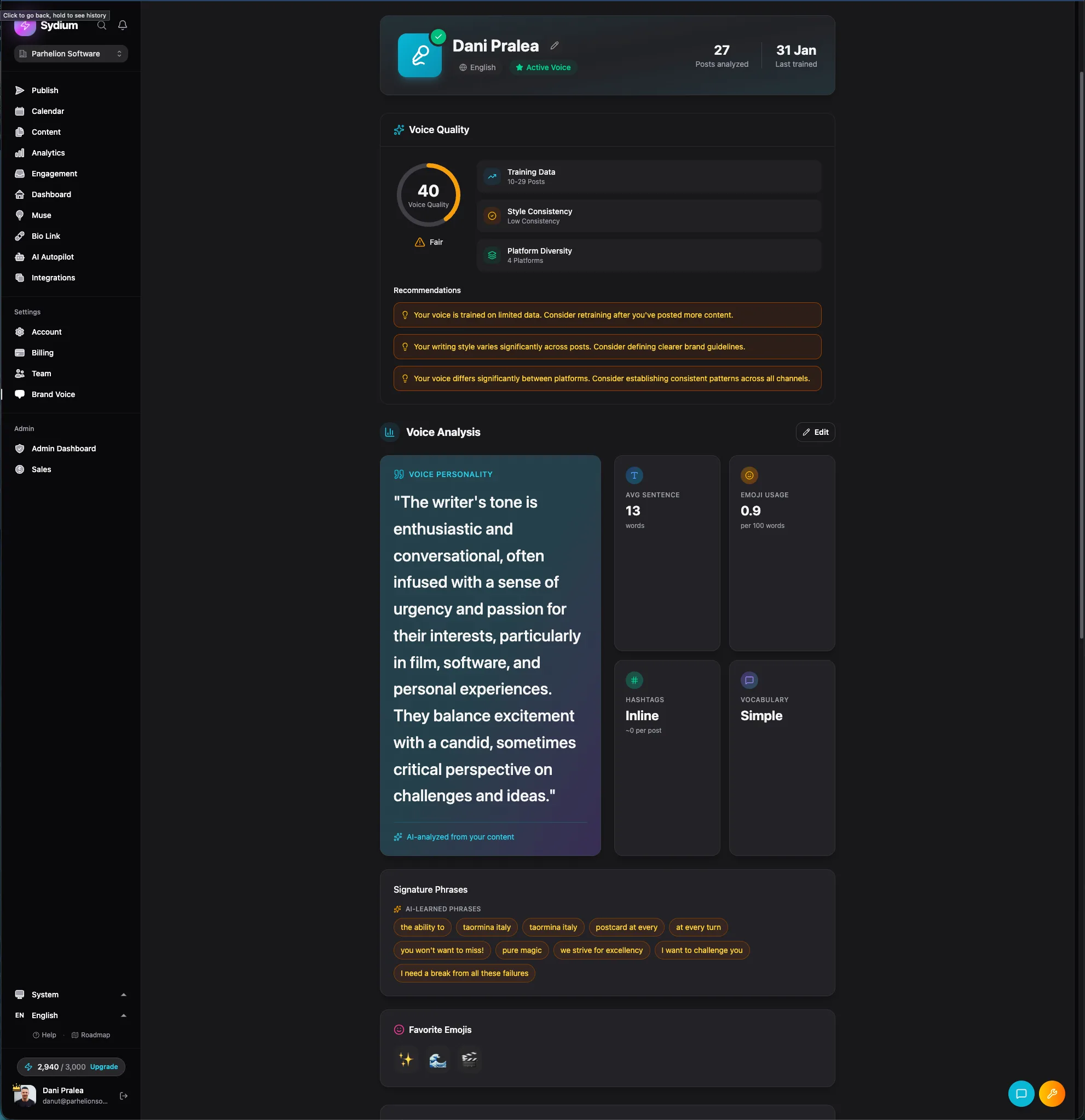
The learning process has three input channels, each feeding into a voice profile that gets more accurate over time.
Channel 1: Your Social Posts
When you connect your social accounts to Sydium, the Brand Voice AI can analyze up to 50 posts per platform across Instagram, TikTok, YouTube, Facebook, and Threads. That's up to 250 posts total if you're active everywhere.
But it doesn't just count word frequency. The AI looks at:
- Tone shifts by platform - You probably write differently on LinkedIn than on TikTok. That's intentional, and the AI captures it.
- Engagement correlation - Which of your posts got the most engagement? The AI weights those higher because they represent your voice at its most effective.
- Structural patterns - Do you lead with a question on Instagram but a statement on LinkedIn? Do your TikTok captions front-load the hook?
- Cultural markers - Slang, references, humor style. Things that make your content feel native to your niche.
Channel 2: Your Website
If you have a website, the AI scrapes it for tone. This matters because your website copy is usually your most considered writing. It's the baseline for your professional voice - the version of you that's been edited and refined.
The scraper looks at headlines, about pages, product descriptions, and blog posts. It extracts the register (formal/informal), sentence length preferences, and the degree to which you use jargon vs plain language.
Channel 3: Uploaded Documents
This is where agencies and established brands get serious value. You can upload PDFs, brand guidelines, style guides, or any document that represents your voice. The AI processes these to understand rules that might not be visible in published content - like "never use exclamation marks" or "always refer to customers as 'members'."
The Voice Profile
These three channels feed into a persistent voice profile with a quality score from 0 to 100. More inputs mean a higher quality score, which means more accurate generation.
The profile captures:
- Primary tone (from 10 presets: professional, casual, friendly, bold, inspirational, authoritative, humorous, educational, conversational, storytelling)
- Vocabulary fingerprint
- Emoji usage rules
- Hashtag strategy per platform
- Hook patterns
- Signature phrases
- Things to avoid (words, phrases, or patterns you never use)
You can see and edit every part of this profile. It's not a black box. If the AI thinks your tone is "casual" but you'd call it "conversational," you can adjust it. The profile is a starting point that improves with every interaction.
The Feedback Loop (Where It Gets Smart)
Here's where Sydium's approach diverges from tools like Jasper or Social9. Those tools train on your content once and call it done. Sydium keeps learning.
Every time the AI generates a caption or post for you, one of three things happens:
- You approve it as-is - The AI notes that this output matched your voice. Reinforcement.
- You edit it before posting - The AI captures the before/after pair. It learns what you changed and why. Did you shorten the sentences? Remove an emoji? Change a word? Each edit teaches it something specific.
- You skip or reject it - The AI notes that this direction didn't work. Negative reinforcement.
The system stores up to 20 of these before/after edit pairs, creating a living dataset of your preferences. Over time, the AI generates content that needs fewer and fewer edits.
The usual arc is that you edit heavily in the first week and wave most captions through with little or no change a couple of weeks later. That's the feedback loop doing its job.
This matters more than most people realize. 64% of the most successful content marketers have documented brand voice guidelines, but only 23% are actively using those guidelines to train their AI tools. The guidelines exist in a PDF somewhere. Sydium puts them to work.
Where Brand Voice AI Gets Used in Sydium
The voice profile isn't locked to one feature. Once trained, it powers everything:
- Autopilot - When Sydium generates and schedules posts automatically, it uses your voice profile for every caption. More on this in our Autopilot guide.
- Manual generation - When you're writing a post and want AI assistance, the generated suggestions match your voice.
- Inbox AI replies - When someone DMs or comments and you want a quick reply suggestion, it sounds like you, not a chatbot.
- Muse daily briefing - When Muse generates daily content ideas, the caption suggestions use your voice.
- Repurpose Studio - When converting a LinkedIn post into an Instagram carousel caption, it adapts the voice to the platform while keeping your identity.
- Automations - Triggered responses and auto-replies maintain your tone.
This is the difference between having a brand voice feature and having a brand voice system. The voice is embedded in the tool, not bolted on.

How It Compares to Other Brand Voice Tools
Plenty of tools do brand voice training. Here is the short version of how they differ.
| Tool | What it does | Where it falls short for social | Entry price |
|---|---|---|---|
| Jasper | Upload up to 8 examples, generate a voice profile, compare with and without it | Built for blog and ad copy, not daily posting across five platforms; 8 examples can't capture per-platform range | $59/mo; brand voice needs the Business plan |
| HubSpot | Brand voice across blogs, emails, social, and SMS in 6 languages | Needs the full marketing suite; social tools aren't the strong part | $800/mo for Marketing Hub Pro |
| Social9 | Builds a custom model from your library, 11 networks and 50+ languages | No feedback loop; no Autopilot or unified inbox using the profile | varies |
| Buffer / Hootsuite | Draft and rewrite captions, repurpose top posts | "Rewrite in a professional tone," not "learn my voice from 250 posts" | varies |
The tools above treat brand voice as a setting. Sydium treats it as a system that learns, adapts, and runs across every feature. Multi-source training (posts plus website plus docs), feedback learning (approve, edit, skip), and cross-feature reuse are what make it work at a different level.
Practical Tips for Training Your Brand Voice
If you're setting up Brand Voice in Sydium (or any tool), here are things I've learned building this system:
1. Start With Your Best Content
Don't connect accounts with 50 mediocre posts. Before training, go through your recent content and note which posts got the best engagement. Those represent your voice at its most resonant. If you can, archive or delete posts that don't represent your current voice before connecting.
2. Be Consistent Across Inputs
If your website says "We deliver enterprise solutions" but your Instagram says "We help small teams crush it," the AI will average these into something bland. Either align your inputs or make sure you're specifying platform-specific voice profiles.
3. Upload Your "Don't" List
The most underrated input is telling the AI what you never do. "Never use exclamation marks." "Never start with a question." "Never use corporate filler like 'synergy.'" Negative constraints are just as valuable as positive examples.
4. Actually Edit the Generated Content
The feedback loop only works if you engage with it. Don't just reject and rewrite from scratch - edit the generated version. Change the words that feel wrong. The AI learns from the delta between what it wrote and what you published.
5. Give It Two Weeks
The voice quality score jumps significantly in the first two weeks as the feedback loop accumulates data. Users who give up after day two are missing the inflection point.
The Numbers Behind Brand Voice Consistency
Why does this matter? Because consistency is revenue.
- Brand consistency across channels increases revenue by 10-33%
- Brands with high consistency grow 2.4x faster than inconsistent brands
- 81% of companies struggle with off-brand content creation
- 60% of marketing materials don't conform to brand guidelines
These numbers get worse as you scale. An agency managing 20 client accounts can't manually ensure voice consistency across 100+ posts per week. A brand voice AI that actually works isn't a nice-to-have - it's infrastructure.
What It Costs
Sydium's Brand Voice profiles scale with your plan, and the 14-day trial gives you Pro-level access to try them:
- Pro: 3 brand voice profiles - enough for one brand across different contexts
- Agency: 23 profiles (3 team + 20 client) - designed for agencies managing multiple brands
- Enterprise: 55 profiles - for large operations with complex brand architectures
Each profile is independent. An agency can train one voice for a fitness influencer client and another for a B2B software company, and the AI won't bleed one into the other.
Your First 10 Minutes With Brand Voice
Setting up your first Brand Voice profile takes about 10 minutes:
- Connect at least one social account (more accounts = better training data)
- Go to Brand Voice in your Sydium dashboard
- Let the AI analyze your connected posts (takes 2-3 minutes)
- Optionally add your website URL and upload any brand documents
- Review the generated voice profile - adjust tone, add constraints, edit anything that feels off
- Generate your first post and see the difference
The quality score starts low and climbs as you provide more inputs and feedback. By the time it hits 70+, you'll notice that generated content needs minimal editing.
If you're managing content for multiple brands, check out our guide on the best social media tools for agencies to see how Brand Voice fits into a multi-client workflow.
The internet is drowning in AI content that all sounds the same. The creators and brands who win from here are the ones who figure out how to use AI without losing the thing that makes people follow them in the first place - their voice. Brand Voice AI isn't about generating more content. It's about generating content that's unmistakably yours, at a speed that lets you show up every day without burning out. Train it, teach it, and let it earn your trust. The quality score will climb. The edits will shrink. And your audience won't be able to tell the difference.
Questions Everyone Asks
What if I don't have 50 posts per platform?
The system works with whatever you have. Even 10-15 posts give it enough to build a baseline profile. More posts just increase the quality score and accuracy.
Does it work for non-English content?
Yes. Analysis and generation work across every language Sydium supports. The AI captures language-specific patterns like formality levels, cultural idioms, and regional vocabulary.
Can I reset my Brand Voice profile and start over?
Yes. You can clear the profile and retrain from scratch at any time. Useful if your brand voice has evolved significantly.
Is my content used to train other users' models?
No. Your voice profile is private to your account. Content you provide for training is used only to build your profile, and is never shared with or used to improve other users' profiles.
Related free tools
Free, no signup, runs in your browser.
- Hashtag Generator - Generate relevant hashtags for your content using AI. Get a mix of popular and niche tags.
- Post Preview & Mockup - See how your post will look before publishing. Create platform-accurate mockups and download as PNG.