I know your spreadsheet. I've seen hundreds of them.
Some have color-coded columns. Some have conditional formatting that took longer to set up than the actual content inside. Some have 14 tabs, each representing a different platform or client, and half of those tabs haven't been touched since February.
And every single one of them breaks the moment your social media operation grows past the "one person doing everything" stage.
I built Sydium's content calendar because I lived through the spreadsheet phase myself. The thing that finally pushed me to build my own tool wasn't a gap in AI or analytics. It was a Google Sheet that had grown so unwieldy it would choke my browser every time I tried to filter by platform.
This post walks through exactly how Sydium's social media content calendar tool replaces the spreadsheet you've been duct-taping together. Not with theory. With the actual features, the actual workflow, and honest comparisons to what you're probably using right now.

The Spreadsheet Ceiling Is Real
Every social media manager figures this out the hard way: spreadsheets were never designed for this job.
They're great for tracking data. They're terrible for managing a publishing workflow. According to Sprout Social, most creators and small teams hit the spreadsheet ceiling around 15-20 posts per week across 3+ platforms. At that point, the time spent switching between the spreadsheet, each platform's native app, and your media files starts eating more time than the content creation itself.
Here's what the spreadsheet fails at:
No visual preview. You can type "carousel about Q2 results" in a cell, but you have zero idea what that looks like until you open Canva, then Instagram, then squint at your feed wondering if the colors clash with yesterday's post.
No scheduling. A spreadsheet can tell you what to post and when, but it can't actually post anything. You still need to open each platform, upload the media, paste the caption, and hit publish. Manually. Every single time.
No collaboration. Yes, Google Sheets supports comments. But have you tried running an approval workflow through spreadsheet comments? It turns into a nightmare of "@mentioned" tags, resolved threads that get un-resolved, and that one team member who always edits the wrong cell.
No filtering at scale. When you've got 200 scheduled posts across six platforms, filtering a spreadsheet becomes a full-time job. Platform filter here, status filter there, date range filter somewhere else. And then someone sorts column B without selecting the full range and your entire month is scrambled.
A HubSpot study found that 63% of marketers say content calendars make them more effective. But notice the word: calendar, not spreadsheet. There's a reason dedicated tools exist.
What Sydium's Content Calendar Actually Does
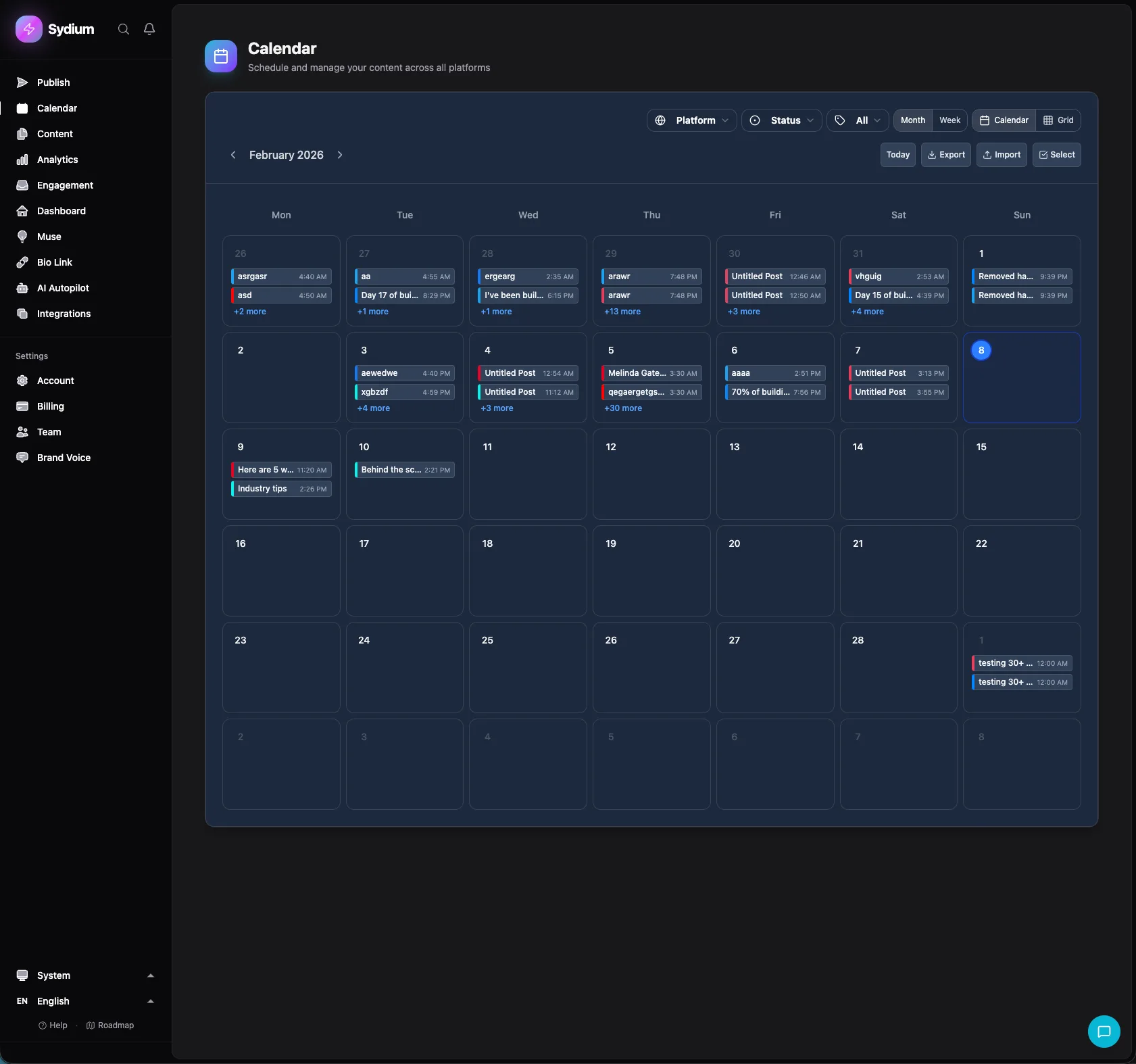
Let me walk through the features one by one. Not a feature list - an actual explanation of what each one does and why it matters.
Three Views: Month, Week, and Day
Sydium gives you three calendar views, and each one serves a different purpose.
Month view is your bird's-eye perspective. You see every post across every platform as colored tiles on a traditional calendar grid. This is where you catch gaps. Tuesday has nothing? Wednesday has five posts stacked on top of each other? You spot that immediately in month view.
Week view zooms in. Now you see time slots within each day. This is where you fine-tune your posting schedule. Is your LinkedIn post going out at 8am and your Instagram post at 8:05am? Week view shows you that overlap so you can spread things out.
Day view is for execution. It shows you everything that's going live today, in chronological order, with full post previews. This is what you check first thing in the morning.
Most calendar tools give you month and week. The day view is underrated. When you're managing multiple clients or platforms, knowing exactly what's going live in the next few hours keeps you from publishing a funeral home's memorial post right next to a dance studio's reel. (I've heard stories.)
Drag-and-Drop Rescheduling
Here's where spreadsheets can't compete at all.
In Sydium, every post on the calendar is a draggable tile. Want to move Monday's Instagram post to Wednesday? Grab it and drag it. The post keeps all its content, media, hashtags, and platform settings. Only the date and time change.
This matters more than people think. According to Buffer's 2026 engagement report, accounts that skip posting weeks consistently underperform their own baseline growth rates. Having to re-enter content from scratch every time you reschedule is the kind of friction that leads to "I'll just post it next week" - which turns into never.
Drag-and-drop also works for reordering queued content. If you use Sydium's queue feature (more on that below), you can rearrange the order of upcoming posts without editing each one individually.
Platform and Status Filtering
This is the feature that made me abandon my spreadsheet forever.
At the top of the calendar, you can filter by platform (Instagram, TikTok, LinkedIn, Facebook, X, YouTube, Threads, Bluesky) and by status (draft, scheduled, published, failed). Toggle any combination on or off.
Want to see only your Instagram drafts? Two clicks. Want to see everything scheduled for LinkedIn and Facebook this week? Two clicks. Want to see which posts failed to publish across all platforms? One click.
In a spreadsheet, this requires either complex filter views that nobody remembers how to use, or separate tabs per platform that you have to maintain manually. In Sydium, it's instant.
Click-to-Edit Content
Every post on the calendar is clickable. Click it and you get the full post editor - caption, media, platform settings, scheduling options, everything. Edit it, save it, and you're back on the calendar.
No navigating to a separate "posts" page. No searching through a list. You see it on the calendar, you click it, you fix it. This sounds simple, and it is. That's the point.
Instagram Grid Preview
If you're serious about Instagram, your grid matters. The visual cohesion of your profile page affects whether someone who lands on your account hits "follow" or bounces.
Sydium includes a grid preview that shows you exactly how your upcoming posts will look on your Instagram profile. You see your existing published posts plus your scheduled ones, arranged in the 3-column grid that visitors see when they visit your profile.
This used to require a separate app. Tools like Later and Preview App built entire businesses around just this feature. In Sydium, it's built into the calendar. Plan your grid, schedule your posts, and see the preview all in one place.
You can drag posts within the grid preview to rearrange them. If a dark photo sits between two dark photos and it all looks muddy, swap it with a lighter one two posts ahead. The schedule adjusts automatically.
CSV Import and Export
I promised that Sydium replaces your spreadsheet. But that doesn't mean you lose your data.
If you're migrating from a spreadsheet, Sydium lets you import posts via CSV. Structure your data with columns for caption, platform, date, time, and media URLs, upload the file, and Sydium creates scheduled posts from every row.
Buffer lets you import up to 100 posts at once. Publer handles 500. Sydium's CSV import handles your entire backlog without arbitrary limits.
Going the other direction, you can export your calendar data to CSV anytime. This is useful for reporting, client presentations, or simply keeping a backup outside the tool.
The point is: your data isn't locked in. If you ever want to leave Sydium (I hope you won't, but I respect the reality), your content comes with you.
Bulk Operations
Sometimes you need to make changes at scale. A client pivots their messaging. A campaign gets cancelled. A platform's API goes down (looking at you, TikTok in 2024) and you need to pull all pending posts.
Sydium supports bulk delete operations directly from the calendar. Select multiple posts, hit delete, done. No clicking into each post individually. No "are you sure?" dialog for every single one.
This might seem like a small thing until you've had to delete 40 posts one at a time on a Saturday night because a brand crisis just hit and everything scheduled needs to stop immediately.
The Five Scheduling Modes
This is where Sydium goes beyond what most calendar tools offer. Instead of just "schedule for a specific time," you get five distinct scheduling modes. Each one fits a different workflow.
1. Publish Now
Exactly what it sounds like. Write the post, click publish, it goes live immediately. Use this for reactive content - something trending, a response to breaking news, or that shower thought that's too good to wait until Tuesday.
2. Schedule (Date + Time + Timezone)
The classic. Pick a specific date, time, and timezone, and the post goes out exactly then. This is what you use for planned campaigns, product launches, or any content that needs to land at a precise moment.
The timezone feature matters more than you'd think. If you're managing accounts for clients in different timezones (a European agency with US clients, for example), you can schedule posts in the audience's local time instead of doing timezone math in your head.
3. Queue (Recurring Time Slots)
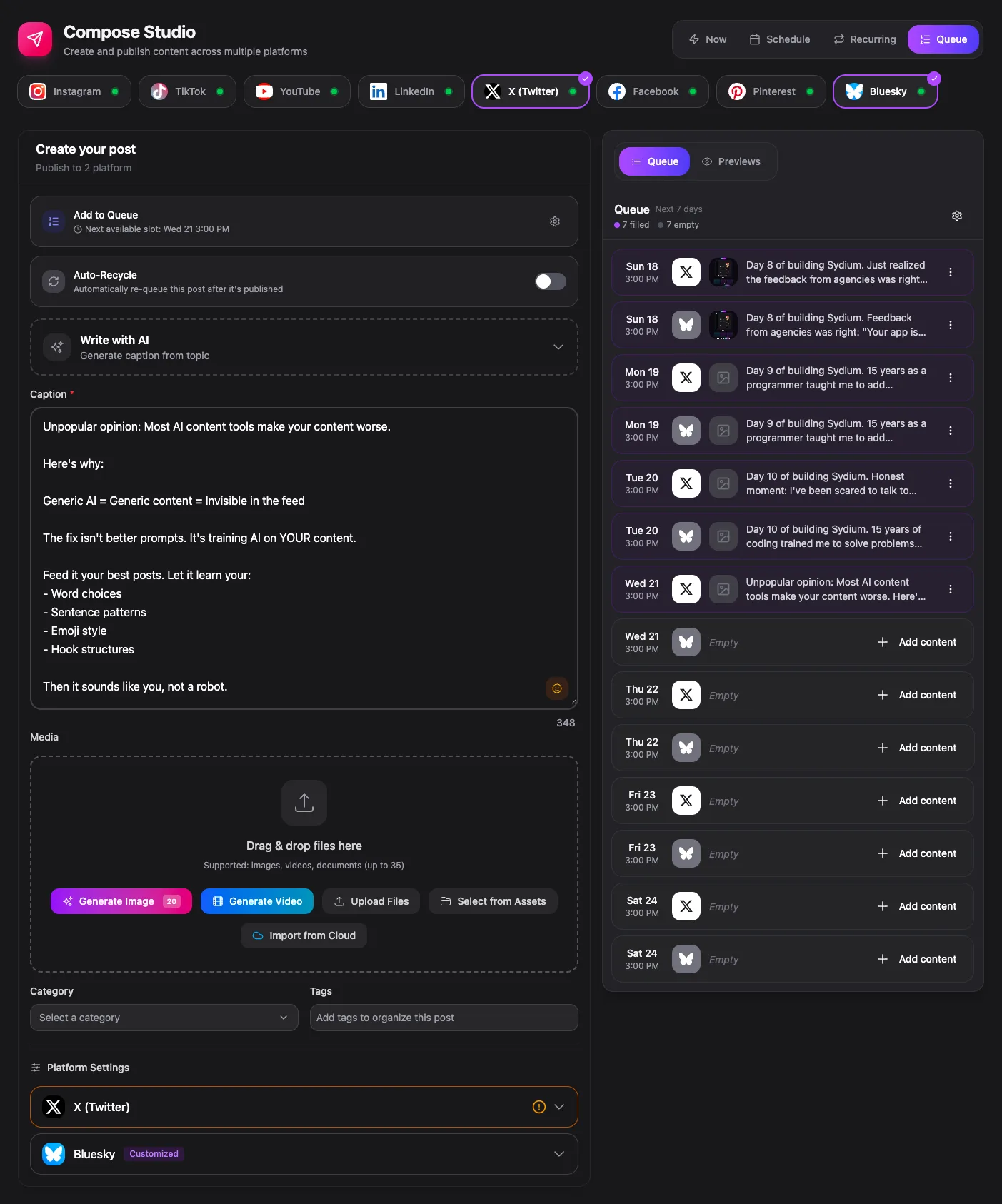
This is my personal favorite. You set up recurring time slots - say, Tuesday and Thursday at 10am, and Saturday at 2pm. Then you just add posts to the queue. Sydium automatically assigns each post to the next available time slot.
This eliminates the most tedious part of scheduling: picking dates and times. You decide your posting rhythm once, then just focus on creating content. The queue fills the slots in order.
If you've used SocialBee's category-based scheduling or Buffer's queue system, this will feel familiar - but with more flexibility in how you set up your time slots.
4. Recurring (Daily/Weekly/Monthly/Custom)
For content that repeats. Weekly tip posts. Monthly roundups. Daily motivational quotes. Instead of creating 30 individual posts for a daily series, create one and set it to recur daily.
You can configure daily, weekly, monthly, or fully custom recurrence patterns. And you can set skip dates - so if your brand doesn't post on holidays, just exclude those dates from the recurrence.
5. Draft
Not everything needs a publishing date. Sometimes you're brainstorming, building a content bank, or waiting for approval. Drafts live on the calendar (or in your drafts list) without a scheduled time. When they're ready, convert them to any of the above modes with one click.

How it compares
Spreadsheets can plan content but can't schedule, preview, or filter it once you're past a few posts a week. Among the real tools: Buffer is simpler but bills per channel, Later is Instagram-first, Hootsuite is enterprise-heavy and priced for it, and Pallyy is a solid budget pick. Sydium's difference is bundling the calendar with a unified inbox, AI generation, and five scheduling modes at a flat rate. Full breakdown in my scheduling tools comparison.
From Spreadsheet to Sydium in 30 Minutes
Here's the actual migration path. I've helped people do this, and it takes about 30 minutes.
Step 1: Export your spreadsheet to CSV. Clean it up first - make sure you have columns for caption, platform, date, and time. Remove any rows that are just notes or headers.
Step 2: Start a Sydium trial. The 14-day trial includes full calendar access.
Step 3: Connect your social accounts. This takes about 2 minutes per platform. Sydium supports Instagram, TikTok, LinkedIn, Facebook, X, YouTube, Threads, and Bluesky.
Step 4: Import your CSV. Upload the file, map your columns to Sydium's fields, and confirm. Your posts appear on the calendar.
Step 5: Review and adjust. Use the calendar views to scan your imported content. Drag anything that needs rescheduling. Click to edit posts that need updates. Set up your queue time slots for future content.
That's it. Your spreadsheet is retired.
If you want to learn more about building an effective content strategy once your calendar is set up, I wrote a detailed guide on how to create a content calendar that covers the strategy side of things.
The jump from spreadsheet to a real content calendar isn't about adding complexity - it's about removing the wrong kind of complexity. You stop fighting conditional formatting and start spending that energy on the content itself. Five scheduling modes, drag-and-drop rescheduling, Instagram grid preview, CSV import for your existing data, and filtering that actually works at scale. That's not "more features." That's fewer problems.
Questions Everyone Asks (And the Honest Answers)
Is Sydium's content calendar free?
The calendar is included on every paid plan, and the 14-day trial gives you full access to it: month, week and day views, drag-and-drop scheduling, and platform filtering, alongside AI content generation, team collaboration and analytics.
What happens if a scheduled post fails?
Sydium flags failed posts in the calendar with a clear error indicator. You can click the post to see what went wrong (expired token, media format issue, API error) and retry or fix it directly. No silent failures.
Can I collaborate with team members on the content calendar?
Yes. Paid plans include team collaboration features. Team members can be assigned different roles (Owner, Admin, Editor, Viewer) with appropriate permissions. Editors can create and schedule content, while Viewers can see the calendar without making changes. Internal approval workflows let junior team members submit content for senior review before publishing.
The Bottom Line
Your spreadsheet got you this far. That's worth acknowledging. But if you're reading a 2,500-word article about content calendar tools, you already know it's not enough anymore.
The switch from spreadsheet to dedicated calendar tool isn't about fancy features. It's about removing friction from the one thing that determines whether your social media strategy actually works: consistent publishing.
Buffer's 2026 research analyzed 4.8 million channel-week observations and found that accounts posting consistently averaged 32 additional followers per week compared to weeks they stayed silent. That's not magic. That's showing up. And showing up is a lot easier when your calendar does more than just hold text in colored cells.
Sydium was built for this. Not because I thought the world needed another social media tool, but because I needed a calendar that could actually keep up with the pace of publishing across eleven platforms, for multiple clients, without falling apart.
If your spreadsheet still works for you, keep using it. Seriously. But the moment it starts holding you back - and you'll know when that moment comes - give Sydium a try. The calendar alone might be worth the switch.
Related free tools
Free, no signup, runs in your browser.
- Best Time to Post Calculator - Find the optimal posting times for each platform based on engagement research.